Finding the nearest gas station seems simple until you are in the middle of the road.
Ad
When the fuel level starts dropping, every kilometer becomes more noticeable.
Fortunately, some apps can show you options without turning the trip into a treasure hunt.
But which one really helps when you need to refuel without wasting time?
Ad
In this text, we will explore the main features and discover which one best suits your trip.
How to Find the Nearest Gas Station Using your Cell Phone

Your cell phone can be a great ally when you need to find the nearest gas station during a trip.
The simplest way is to open a map app and search for gas stations. Your current location helps find options close to where you are.
- Open the map app of your choice.
- Turn on your cell phone’s location to show nearby results.
- Search for gas stations in the search bar.
- Check the options displayed on the map.
- Compare distance, ratings, and other available information.
What if you are already driving?
In this case, avoid using your cell phone while the vehicle is moving.
Ideally, use voice commands or set up the next stop before continuing.
Waze App: Find Gas Stations Along your Route

If you are already traveling, Waze can be especially useful for finding the nearest gas station.
The app allows you to search for gas stations directly during route planning or navigation.
How does it work?
- Open Waze and tap the search bar.
- Then, choose the Gas Stations category.
- The app will show options near the searched area.
- You can select a result and check the route to it.
What makes Waze different?
The main highlight is the combination of navigation and gas station information.
You do not need to leave your route to look for somewhere to refuel. Waze also displays fuel prices available in its data.
Best for those who are traveling
Waze makes a lot of sense for anyone who wants to find fuel without losing their route.
💡 Premium version: Waze is free and does not require a premium plan.
You can use the location and navigation features without paying for a subscription.
Google Maps App: Locate Gas Stations Near You

Google Maps also makes it easier to find the nearest gas station.
Simply search for gas stations directly in the app. The results appear on the map and can be checked individually.
How do you find a gas station?
- Open Google Maps on your cell phone.
- Type gas station in the search bar.
- Check the results near your location.
- Tap an option to open its details.
- Then, choose the route to get to the establishment.
An interesting feature for trips
Maps allows you to add stops during navigation.
That way, you can search for a gas station without having to end your route.
Where does Maps stand out?
The biggest advantage is the amount of information gathered in one place.
In addition to fuel, you can check ratings, hours, photos, and location.
💡 Premium version: Google Maps is free and does not have a premium subscription for these features.
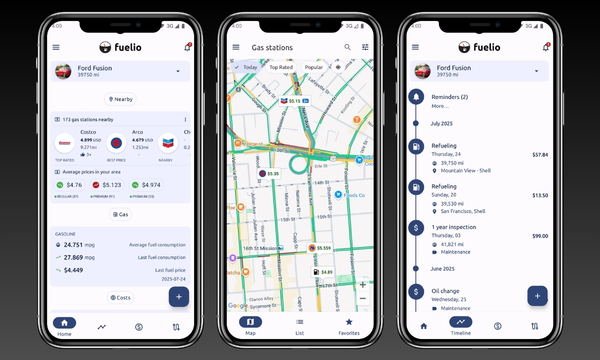
Fuelio App: Find Gas Stations and Track your Refueling

Fuelio follows a different approach for anyone looking for the nearest gas station.
Instead of working only as a navigator, it also tracks fuel, consumption, and expenses.
More than Just Finding a Gas Station
Imagine that you refuel today and record the amount you paid.
Later, you can track how much you spent during the month.
Fuelio also calculates information related to fuel consumption and vehicle efficiency.
For those Who Like to Track Numbers
The app offers charts and statistics about refueling and expenses.
You can use this information to better understand your car’s behavior.
Who is it best for?
Fuelio is especially interesting for those who want to find gas stations and control expenses.
It works best as a companion for managing your car.
💡 Premium version: Fuelio Pro has plans starting at US$ 4.99.
What to Check before Choosing a Gas Station on the Road
Finding the nearest gas station does not necessarily mean finding the best stop.
During a trip, it is worth looking at a few details before leaving your route.
Distance is important, but it should not be the only criterion.
Check the ratings
Ratings can help identify recent experiences from other drivers.
Look for comments about service, cleanliness, and facilities.
Check the opening hours
There is no point in finding a nearby gas station if it is closed.
Check the listed hours before changing your route.
Compare prices
If prices are available in the app, compare them before choosing.
Consider the detour
A cheap gas station may not be worth it if it requires a major detour.
Compare the fuel price and the additional time of the stop.
Tips to Save Fuel during your Trip
Finding the nearest gas station helps during the trip, but you can also reduce fuel consumption.
- Avoid unnecessary acceleration: maintaining a steady and smooth driving style can help reduce consumption.
- Check the tires: before traveling, check the pressure recommended by the manufacturer to avoid waste.
- Remove unnecessary weight: take only what you really need, since excess weight can increase the engine’s effort.
- Plan your stops: look for the nearest gas station before the tank reaches its limit.
- Do not wait until the tank is empty: refueling in advance avoids rushed choices on roads with few gas stations.
Ready to Refuel and Continue your Trip?
Finding the nearest gas station can be much simpler with the help of your cell phone.
Waze, Google Maps, and Fuelio offer different approaches for those on the road.
Before choosing, consider your route, the price, and the information available.
With a little planning, you can avoid that desperate situation of looking for fuel with the gauge almost in the red.
And on the road, let’s be honest: refueling calmly is much better than driving while hoping a gas station appears!